
Buy a template if you run one to three trucks and need pricing consistency this month, build your own if you have a full-time office manager and unique service lines, and hire a consultant if you’re scaling past five techs and margins keep slipping despite a decent price list. The right call depends less on budget and more on how fast you need consistent numbers in front of your techs and how much internal bandwidth you have to maintain them afterward.
Here’s the quick breakdown by business profile:
- Solo operator or two-truck shop: Buy a proven flat-rate template, plug in your loaded labor rate, and start using it within a week. A downloadable HVAC pricing template gets you 80% of the way there.
- Small multi-tech shop (3-8 techs): Buy a template or subscribe to pricebook software, but budget real hours to customize markup rules and complexity tiers to your market.
- Scaling or multi-location business: Hire a consultant to run the rollout, train dispatch and field staff, and build the KPI tracking that tells you whether the new pricing is actually working. A pure download rarely survives contact with five locations and a mixed fleet of techs.
If you’re not sure which bucket you fall into, the fastest gut check is this: can your office manager currently tell you gross margin by job type without pulling a report from QuickBooks? If the answer is no, you have a bigger problem than pricing, and that’s usually where a scoped consulting engagement earns its cost faster than another template ever will.
Key Takeaways
A flat-rate HVAC price book only protects margin when it’s built on a fully loaded labor rate and backed by a maintenance and training plan, not just a downloaded template.
| Point | Details |
|---|---|
| Match the path to your size | Solo shops buy templates, mid-size shops use software, scaling businesses hire a consultant. |
| Loaded labor rate first | Calculate fully burdened labor cost before pricing a single task entry. |
| Every entry needs full fields | Include parts, labor hours, markup, complexity tiers, and warranty rules on each task. |
| Pilot before shop-wide rollout | Test with two contrasting techs and track close rate, margin per call, and quote accuracy. |
| Update quarterly, not yearly | Refrigerant and parts costs shift often enough to break a static price book fast. |
| Training determines adoption | A price book without staff training and dashboarding tends to fade within two quarters. |
| Consider a hybrid approach | Rebuildingthetrades pairs a baseline price book with consultant-led rollout and KPI tracking for scaling shops. |
Table of Contents
- Why an HVAC Price Book Matters More Than a Price List
- Comparing Your Options: Templates, Software, DIY, or a Consultant
- How Do You Choose the Right Approach for Your Shop?
- What Fields Belong in a Complete Price Book Entry?
- Building, Testing, and Rolling Out Your Price Book
- What Do Measurable Results Actually Look Like?
- When Should You Buy, Build, or Hire Help?
- How Rebuildingthetrades Helps You Build and Roll Out a Price Book
- Frequently Asked Questions
- Sources
Why an HVAC Price Book Matters More Than a Price List
A price list tells a technician what a part costs. An HVAC price book tells them what to charge a customer for the whole job, labor included, before they’ve even opened the truck. That distinction is the entire reason flat-rate pricing exists: it removes the moment where a nervous or inexperienced tech starts negotiating against himself in a customer’s kitchen.
The mechanics matter here. According to ServiceTitan’s pricing formula, a flat-rate price equals fully burdened labor cost plus material cost plus overhead allocation, divided by one minus your target gross margin percentage. That formula only works if the labor rate feeding it is accurate, and most shops underestimate it badly. A fully burdened rate includes pay, benefits, non-billable time, vehicle costs, insurance, and admin overhead, not just the number on a tech’s paycheck. Skip that step and every price in the book is quietly wrong before you’ve priced a single job.
This is also where the standard industry term matters. Some contractors call this document a “flat rate book,” others say “service price guide,” but the trade press and most pricebook software settle on HVAC price book or HVAC pricebook as the umbrella term, covering both service and installation pricing. Use whichever phrase your team understands, but keep the structure consistent across every job type you sell.
Comparing Your Options: Templates, Software, DIY, or a Consultant
Four real paths exist for getting a working price book in front of your techs, and each one trades speed against customization in a different way.
| Option Category | Best For | Price Model | File Formats & Integrations | Includes Training | Customization & Setup Help | Updates & Maintenance | Speed to Implement |
|---|---|---|---|---|---|---|---|
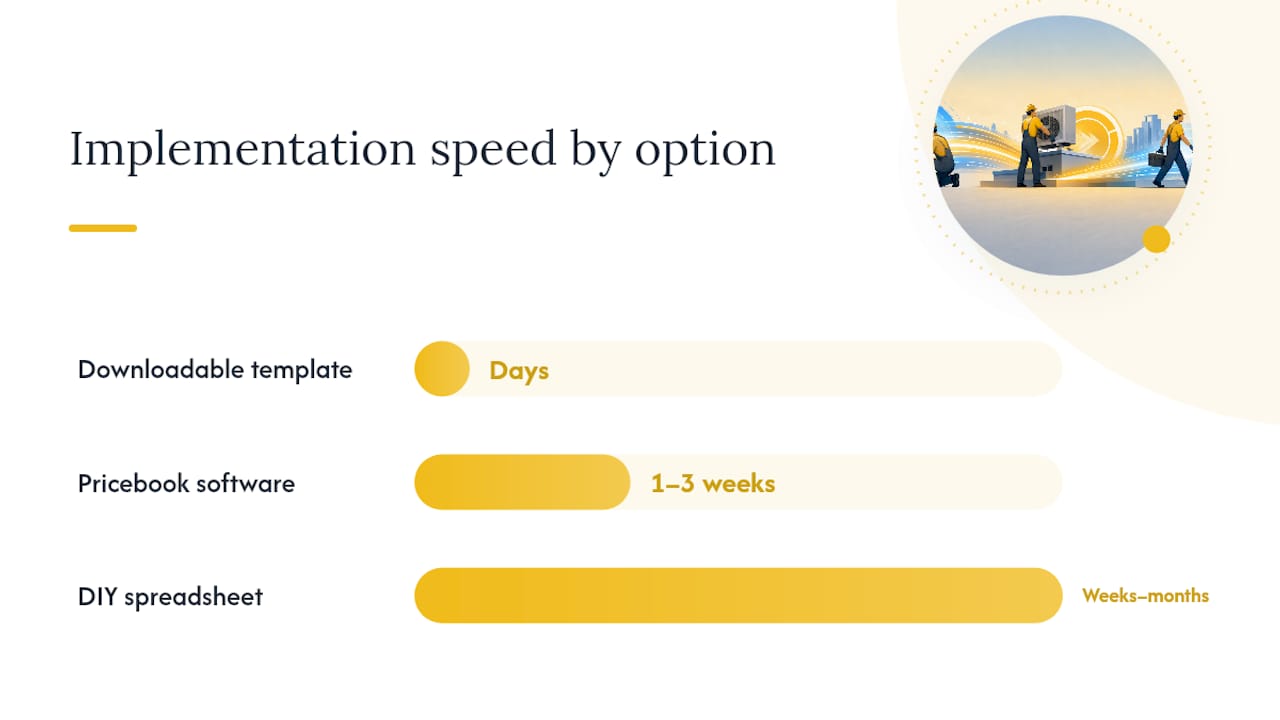
| Downloadable template | Solo operators, 1 to 3 trucks | One-time purchase, often under $100 | CSV, Excel, PDF | Rarely, sometimes a setup guide | Self-service, you edit the spreadsheet | Manual, you own every update | Days |
| Pricebook software | Growing shops, 3 to 8 techs | Monthly subscription, per-tech or flat | App-ready, CSV import, HouseCall Pro and similar field service integrations | Often includes training videos | Vendor support during onboarding | Vendor pushes periodic updates | One to three weeks |
| DIY spreadsheet | Owner-operators with strong Excel skills | Free, aside from your time | CSV export possible, no native app sync | None, you build the logic yourself | Entirely on you | Entirely on you | Weeks to months |
| Consulting / turnkey rollout | Scaling shops, multi-location businesses | Project fee, scoped engagement | Customized to your existing software stack | Full staff training and field coaching included | Fully customized to your labor rates and market | Ongoing advisory available | Four to eight weeks, often faster with focused pilots |
A few things separate the serious options from the throwaway ones. Reputable downloadable templates, like the one offered through Build-Folio, come with sample line items and markup guidance you can sanity check against your own numbers. Look for a preview page before you buy; a vendor unwilling to show you a sample entry is telling you something.
Pricebook software goes further. Platforms like the one described by Plenum offer compositional pricing that keeps bundle prices synchronized automatically when a part cost changes, plus direct AHRI equipment data pulls so install pricing reflects current spec sheets instead of a number someone typed in two years ago. Free builders such as LeadDuo’s price book tool sit in between, offering CSV and Excel exports with sample flat-rate ranges you can adjust, useful for testing the concept before committing to paid software.
The DIY spreadsheet route works, but only if you have someone internally who understands both HVAC labor and spreadsheet logic. Most shops that try this end up with a price book that’s accurate the day it’s built and stale six months later, because nobody owns the update cadence.
Consulting engagements, the kind Rebuildingthetrades runs for trade businesses, solve a different problem entirely. You’re not just buying numbers, you’re buying the rollout: the onsite audit, the pricing workshop, the field pilot, and the staff training that gets techs actually using the book instead of quoting from memory.
How Do You Choose the Right Approach for Your Shop?
Answering a handful of honest questions before you spend a dollar saves you from buying software you’ll abandon in month three or a template you’ll never customize.
- How many techs need to use this daily? One or two techs can work from a spreadsheet. Five or more need something app-based they can pull up on a phone mid-job.
- Do you already have P&L visibility by job type? If margin data doesn’t exist today, a price book alone won’t fix your profitability problem. You need the reporting layer first or alongside it.
- How often will you realistically update pricing? Refrigerant costs shift, part costs shift, your labor rate shifts when you give raises. If nobody owns quarterly updates, a static spreadsheet will decay fast.
- What’s your team’s comfort level with apps? A younger crew adopts app-based pricebook software quickly. A veteran crew used to writing quotes by hand may need more hand-holding, or a simpler paper-adjacent format at first.
- What’s your timeline pressure? If you’re bleeding margin on installs right now, you don’t have three months for a DIY build.
When you’re evaluating a specific vendor or template, ask these questions directly:
- Can I see a sample page or preview file before purchasing?
- What’s the update policy, and is it included or an extra fee?
- Does it import into HouseCall Pro or whatever field service software I already run?
- Who owns the data, and can I export it if I switch tools later?
- Is training included, or am I on my own after the download hits my inbox?
Watch for red flags that separate a legitimate option from a rushed cash grab. No sample page available before purchase is one. No stated update policy is another, since refrigerant and equipment pricing shift constantly and a book frozen in time actively costs you money. A closed, proprietary file format that won’t export to CSV locks you into a single vendor. And any pricebook promising aggressive margins without asking about your actual labor costs first is guessing, not calculating.
Pro Tip: Before you roll out a new price book shop-wide, pilot it with your best tech and your most skeptical tech at the same time. If both can execute a quote confidently within a week, you’re ready to scale it. If either struggles, you’ve found your training gap before it cost you a callback.
What Fields Belong in a Complete Price Book Entry?
A price book entry that’s missing half its fields isn’t a price book, it’s a guess with a nicer font. Every task entry needs the same skeleton, whether it’s a $150 diagnostic or a $9,000 install.
Each entry should include:
- Task name and short description clear enough that a new hire understands the job without asking a supervisor.
- Included items listing exactly what’s covered in the flat price.
- Excluded items stating what triggers an upcharge, like additional refrigerant beyond a set amount.
- Parts list with SKU numbers and current unit cost, not last year’s cost.
- Loaded labor hours for the task, based on real job history, not a guess.
- Loaded labor rate applied consistently across every entry, calculated the way the Bureau of Labor Statistics frames occupational wage data, then adjusted upward for your actual benefits and overhead load.
- Markup rules for parts, typically a multiplier applied consistently across the book.
- Overhead allocation and target gross margin baked into the formula, not applied inconsistently job by job.
- Complexity tiers and price modifiers for attic access, rooftop units, or tight crawlspaces.
- Warranty or callback rules specifying what’s covered free and what isn’t.
- Diagnostic or dispatch fees, stated separately from the repair price.
- After-hours multipliers for nights, weekends, and holidays.
Entries should be organized by category: diagnostic work, electrical controls, refrigerant work, motors and blowers, full installs, and maintenance plans. That grouping matters for technician navigation as much as reporting, since you want to know which category is driving margin and which one is quietly bleeding it.
Here’s a compact example of what one entry looks like in practice:
If you’re building an app-ready CSV rather than a static spreadsheet, make sure every field above maps to an importable column your field service software actually recognizes, since a beautifully organized spreadsheet that won’t import into HouseCall Pro just becomes extra data entry for your office staff.
Building, Testing, and Rolling Out Your Price Book
A price book that lives in a binder nobody opens is worse than no price book at all, because it gives you false confidence that pricing is handled. The rollout matters as much as the content.

| Phase | Task | Typical Duration |
|---|---|---|
| 1 | Collect baseline labor and job history data | 1 to 2 weeks |
| 2 | Calculate fully loaded labor rate | 2 to 3 days |
| 3 | Prioritize highest-frequency tasks | 3 to 5 days |
| 4 | Populate entries with parts, labor, and modifiers | 1 to 2 weeks |
| 5 | Run field pilot with two to three techs | 2 weeks |
| — | Collect exceptions and feedback | Ongoing during pilot |
| — | Finalize and push updates shop-wide | 1 week |
A template-only path can compress this into two to three weeks total if your data is already clean. A full consulting-led rollout typically runs four to eight weeks, but that includes staff training and KPI dashboarding a template alone will never give you.
During the pilot, track a handful of numbers that actually tell you whether the new pricing is working:
- Close rate on quotes before and after rollout.
- Average ticket size across the same job categories.
- Margin per call, pulled from actual job costing, not estimated.
- Quote accuracy, meaning how often the final invoice matches the flat-rate quote.
- Tech adoption rate, meaning how many techs are actually using the book versus quoting from memory.
Pro Tip: Pick your pilot techs deliberately. Choose one who’s naturally disciplined about following process and one who tends to freelance pricing on the fly. If the price book wins over the second tech, you know it’s solid enough to hold up against every excuse your team will eventually make.
Give pilot techs a short script for presenting flat-rate pricing to customers, and build a simple exception log for edge cases the book didn’t anticipate. Those exceptions become your first quarterly update.
What Do Measurable Results Actually Look Like?
Numbers matter more than promises here, and this is where a hands-on rollout separates itself from a template sitting in a shared drive. Rebuildingthetrades’ Tri-Trade case study documents a client engagement that produced a $21 million run rate alongside improved operational clarity, the kind of outcome that comes from pairing pricing structure with the accountability systems and reporting that make a price book stick.
A typical Rebuildingthetrades price-book engagement follows a defined scope:
- Onsite operational audit to establish current margin visibility and process gaps.
- Pricing workshop to build or refine the flat-rate structure against real labor and parts data.
- Field pilot with selected technicians, mirroring the testing protocol above but with hands-on coaching.
- Staff training across dispatch, sales, and field roles so everyone quotes from the same book.
- KPI dashboarding so ownership can see close rate, margin per call, and override frequency in one place going forward.
The pattern across these engagements is consistent: pricing structure alone rarely moves the needle. It’s the combination of a well-built price book, disciplined field adoption, and a reporting system that catches price overrides before they become a habit. Shops that skip the training and dashboard layer tend to see initial improvement that fades within two quarters, because nothing is holding the new discipline in place.
When Should You Buy, Build, or Hire Help?
Every price book conversation eventually comes down to a threshold question, and pretending otherwise wastes everyone’s time. If you’re running under $1.5 million in annual revenue with fewer than three techs, buy a template and move on. The math is simple enough that a consultant’s fee doesn’t pencil out yet, and your main risk is inconsistency, not complexity.
Somewhere between $1.5 million and $5 million, with four to ten techs, the calculation shifts. This is the range where a decent template starts breaking down, not because the pricing logic is wrong, but because nobody owns updating it and dispatch starts making exceptions that quietly erode margin. Pricebook software earns its subscription cost here, provided someone owns the maintenance.
Past that, once you’re managing multiple locations or a tech count in the double digits, the operational complexity usually outpaces what any static document can solve. This is exactly where Rebuildingthetrades tends to recommend a hybrid approach: buy or build a baseline template to get numbers in front of techs immediately, then layer a consultant-led rollout on top to handle training, dashboarding, and the accountability systems that keep the pricing honest six months later. A price book without adoption tracking is just an expensive spreadsheet.
One caveat worth stating plainly: shops with legacy processes, thin margins, or an owner who’s historically priced by gut feel need more change management than technology. No software fixes a culture where the owner still overrides every quote personally. That’s a leadership and accountability problem first, a pricing problem second.

How Rebuildingthetrades Helps You Build and Roll Out a Price Book
If you’ve read this far, you already know a template gets you numbers, but numbers alone don’t guarantee adoption. Rebuildingthetrades exists for the gap between the two: shops that bought pricing software or downloaded a template last year and still don’t trust the margin data coming out of their own P&L.

A typical engagement scopes to what your shop actually needs, not a fixed package. That can include price book design built from your real labor costs, an onsite operational audit, pilot management with your field techs, staff training across dispatch and sales, and KPI dashboarding so you can see close rate and margin per call without waiting on a monthly report. Engagements are project-based, run over multiple months, and are built specifically for trade businesses like HVAC, plumbing, and electrical contractors rather than generic small-business consulting. The Tri-Trade case study shows what that combination of pricing structure and operational accountability can produce over time.
If you’re past the template stage and ready to talk through a scoped audit or pricing rollout for your shop, the next step is simple: request a proposal through the pricing page and outline where your current pricing process is breaking down.
Frequently Asked Questions
What should an HVAC price book include at minimum?
Every entry needs a task description, parts list with current costs, loaded labor hours, your loaded labor rate, markup rules, complexity modifiers, and warranty terms. Skip any of these and technicians end up guessing or negotiating price in the field.
How much does an HVAC pricing guide typically cost?
Downloadable templates are typically available for a modest one-time purchase. Pricebook software runs as a monthly subscription, often priced per tech. Consulting engagements are scoped projects priced around the size of the rollout, typically running into the thousands rather than hundreds given the training and dashboarding involved.
How do I calculate HVAC installation pricing using a flat-rate formula?
Add your fully burdened labor cost, material cost, and overhead allocation, then divide by one minus your target gross margin percentage. The result is your flat price before any complexity modifiers get applied.
Can I import a price book into HouseCall Pro or similar field service software?
Most modern pricebook software and many downloadable templates export to CSV formats compatible with popular field service platforms. Always confirm import compatibility before purchasing, since closed or proprietary formats can lock your data into a single vendor.
How often should I update my HVAC price book?
Quarterly at minimum, since refrigerant costs and parts pricing shift often enough to erode margin if left static for a full year. Shops with volatile supplier pricing may need monthly reviews on key parts lines.
Is it better to buy a template or hire a consultant for HVAC pricing?
It depends on your tech count and current margin visibility. Templates work well under three trucks. Past that, especially with multiple locations, a consultant-led rollout typically produces better long-term adoption because it includes training and KPI tracking a template alone can’t provide.
Sources
Building accurate price book entries means pulling from sources beyond your own job history, especially for labor benchmarks and regulatory costs that shift independent of your business.
- Occupational Outlook Handbook: Heating, Air Conditioning, and Refrigeration Mechanics and Installers | Bureau of Labor Statistics
0 Comments