
A change order is a written amendment to the contract that changes scope, cost, or schedule, and the single most important action you can take is documenting the triggering event and securing written authorization before work proceeds. Owners, architects, or the GC’s authorized representative typically sign off, and work should only advance on a signed change order or a documented change directive, never a verbal promise.
TL;DR:
- Proper documentation and written approval are crucial before work begins on any change order to avoid disputes and ensure enforceability.
- Most common triggers for change orders include unforeseen site conditions, owner requests, design errors, failed inspections, and new regulations.
- A comprehensive change order package must include project details, clear scope description, detailed costs, schedule impact, updated contract value, and signatures.
- Following a six-stage process—identify, document, price, submit, negotiate, and update—reduces approval time and minimizes disputes.
- Maintaining a disciplined habit of early logging, documenting, and tracking change orders is more vital for profitability than perfecting pricing methods.
Table of Contents
- Understanding the Change Order Process: Key Terms You Can’t Confuse
- When Do You Need a Change Order? Common Triggers in the Field
- Six Elements Every Change Order Package Must Include
- The Change Order Workflow: From Discovery to Closeout
- How to Price a Change Order: Lump-Sum, T&M, and Markup
- Documentation and Notice Requirements That Protect Your Claim
- Who Signs a Change Order and When Can Work Start?
- Handling Disputes and Preserving Your Claim
- What Disciplined Change Order Capture Looks Like in Practice
- Templates and Standards Worth Bookmarking
- Why Most Change Order Advice Gets the Priority Backward
- Sources
Understanding the Change Order Process: Key Terms You Can’t Confuse
Getting paid depends on knowing exactly which document you’re holding. A change order (CO) is a binding amendment to the original contract, formally modifying scope, cost, or schedule once both parties agree. A change order request (COR) is the proposal stage, the number you’re pitching before anyone signs anything. A change directive (CD) is different altogether: it’s a unilateral instruction from the owner to proceed before the price and time impact are settled, and it’s where most disputes originate later on.
Mixing these up costs contractors money. Here’s the quick reference:
- COR: your proposal, not yet binding
- CO: executed, binding, enforceable
- CD: directive to proceed now, valuation pending
Treat a CD like the loaded gun it is. You can proceed on it, but only with airtight documentation of costs as they happen, because you’re negotiating the price after the work is already done.
When Do You Need a Change Order? Common Triggers in the Field
Most change orders trace back to a handful of recurring situations. Unforeseen site conditions (rock where soil was expected, hidden plumbing behind a wall you’re demoing) top the list. Owner-requested upgrades, design errors caught during shop drawing review, failed inspections requiring rework, and new regulatory requirements round out the usual suspects.
A plumbing crew that hits cast iron instead of PVC mid-trench, or an electrician who discovers the panel schedule doesn’t match the as-builts, both have a legitimate change order in front of them. The response should be automatic:
- Photograph the condition before touching anything else
- File an RFI if the scope is ambiguous
- Log it in the daily report with time and date
- Send preliminary written notice to the owner or GC that same day
Speed here isn’t optional. The clock on your notice window starts the moment the condition is discovered, not when you get around to writing it up.
Six Elements Every Change Order Package Must Include
A change order that gets rejected or delayed usually has a hole in it, not a pricing problem. Build every package with these six elements and approvals move faster because there’s nothing left to ask.
- Project and contact information — project name, CO number, date, and the names of everyone who needs to sign
- Clear scope narrative — what changed and why, backed by photos, revised drawings, or the RFI that triggered it
- Detailed cost breakdown — labor, material, equipment, subcontractor quotes, and markup shown separately, never lumped
- Schedule impact — days added or saved, and whether the change touches the critical path
- Updated contract value — the new total, clearly reconciled against the original sum
- Signature block and routing path — who signs first, second, and last, and by when
These six elements match what Procore identifies as standard practice across the industry, and skipping any one of them is the most common reason a CO sits on someone’s desk for three weeks.
Pro Tip: Number every change order sequentially from day one of the project, even before you expect to need one. “CO-001” sitting unused in your template looks a lot more professional than scrambling to figure out numbering conventions mid-dispute.
The Change Order Workflow: From Discovery to Closeout
A change order that follows a consistent sequence gets approved faster and disputed less. The AACE International standard for contract change management lays out six stages, and skipping any of them is where most contractors lose leverage.
- Identify and log the change the moment it’s discovered. Enter it in your change order log with a placeholder number, even before you know the cost.
- Document immediately. Photos, an RFI, and a daily report entry happen within hours, not days.
- Price it. Draft a preliminary COR with a rough range if the owner needs an early signal, then follow with the full priced package once quantities are firm.
- Submit through the correct channel, whether that’s the architect, the GC’s project manager, or directly to the owner’s rep depending on your contract’s chain of command.
- Negotiate. Owners commonly push back on markup percentages or dispute whether a condition was truly unforeseen. Counter with your cost breakdown and reference the original scope documents rather than re-arguing entitlement from scratch.
- Execute and update. Once signed, immediately update your schedule of values, your accounting system, and your project schedule so the change flows into billing and work-in-progress reports without a lag.
- Track and close out. Compare actual cost against the approved amount, and feed the variance into your estimating database for the next bid.
The steps that get skipped most often are the first and the last. Contractors are quick to price a change and slow to log it early or review it afterward. A change order log that sits untouched for two weeks is how a $4,000 discrepancy becomes a $40,000 argument at closeout. Reviewing that log every week, rather than every month, is one of the cheapest risk controls available to a project team.
How to Price a Change Order: Lump-Sum, T&M, and Markup
Pricing method depends on how well-defined the scope is at the time you write the change order. Lump-sum pricing works when quantities and labor hours are knowable in advance, and it shifts productivity risk onto the contractor in exchange for a cleaner negotiation. Time and materials (T&M) pricing fits poorly-defined scope, especially emergency or unforeseen-condition work, and shifts risk back toward the owner since actual hours and materials get billed as incurred.
A defensible estimate, regardless of method, includes:
- Burdened labor rates (wages plus taxes, insurance, and benefits)
- Material costs with current quotes, not stale catalog pricing
- Equipment rental or ownership costs
- Subcontractor quotes attached in full
- Waste factors and applicable sales tax
- Markup on all of the above, stated as a percentage with your rationale documented
If the change extends the schedule, calculate general conditions separately: daily supervision, temporary facilities, and equipment rental multiplied by the added days. This number gets missed constantly because it lives outside the direct cost of the work itself.
Pro Tip: For T&M work, get the owner’s representative to initial daily tickets on-site. A signature obtained same-day is worth more than any invoice you send three weeks later.
Documentation and Notice Requirements That Protect Your Claim
Contracts commonly set notice windows between 7 and 21 days from when a changed condition is discovered, and missing that window is one of the fastest ways to forfeit an otherwise valid claim. The clock doesn’t wait for you to finish pricing the work.
What to collect, every time:
- Photos and video of the condition, time stamped
- Daily reports referencing the change by its log number
- The RFI, if one was filed, linked directly to the CO
- Signed T&M tickets and receipts for materials or rentals
- The written notice itself, sent and acknowledged
A GAO review of federal construction projects found that process discipline and documentation consistency are directly tied to controlling cost growth and schedule slippage. Keep every record in one CO file, organized by number, so an auditor or arbitrator can trace the story in five minutes instead of fifty.
Who Signs a Change Order and When Can Work Start?
Signature hierarchies vary by contract, but the pattern is consistent: the party with budget authority signs last, and everyone below them routes for approval in order, usually field supervisor, then project manager, then owner or architect. Get familiar with your specific contract’s chain before the first change ever comes up.
Work can start before a signed CO exists only when you’re operating under a documented change directive, and even then, protect yourself:
- Get the directive in writing, even if it’s just an email confirming a verbal instruction
- Log time and materials separately under a distinct cost code from day one
- Convert the directive into a formal CO as soon as pricing is agreed, don’t let it linger as an open directive
- Update your accounting and schedule the moment either the CO or CD status changes, not at month-end
Proceeding on a verbal handshake with no paper trail is how contractors do the work and eat the cost.
Handling Disputes and Preserving Your Claim
When an owner rejects, delays, or ignores a change order, your response needs to be immediate and procedural, not emotional. Document the rejection in writing and reference the specific contract clause that governs disputed changes. Serve any formal notices your contract requires, on the timeline it requires, even if you expect the issue to resolve informally.
- Continue tracking costs under segregated cost codes so the disputed work never blends into your general ledger
- Keep daily logs running exactly as if the CO were approved, because you may need them in arbitration
- Notify your surety early if the dispute threatens bonding capacity or project completion
- Loop in counsel before you send anything that could be read as a waiver of claim
Pro Tip: *Propose an interim partial payment or a neutral third-party valuation before escalating to formal dispute resolution.
Negotiation tactics that work: offer to segregate the disputed amount and keep billing on undisputed work moving, so cash flow doesn’t stall while the argument plays out.
What Disciplined Change Order Capture Looks Like in Practice

Rebuilding the Trades works exclusively with trade businesses, HVAC, plumbing, electrical, roofing, remodeling, and siding companies, on the operational systems that separate contractors who capture every dollar of scope change from those who quietly absorb it. That focus matters because change order discipline isn’t a form-filling exercise; it’s a leadership and accountability problem as much as a paperwork one.
The operational framework Rebuilding the Trades installs combines data-driven financial reporting with hands-on leadership training, so field teams actually use the change order log instead of treating it as busywork. The results show up in client outcomes: case studies report businesses reaching $21 million run rates alongside measurably clearer financial visibility after implementing these accountability systems.
- Financial dashboards that flag unbilled change orders before they age past 30 days
- Leadership training that makes field supervisors accountable for same-day documentation
- Accountability systems tying project managers’ performance reviews to CO capture rates
None of this replaces the checklist. It’s what makes the checklist stick.
Templates and Standards Worth Bookmarking
For standardized change order formats, ConsensusDocs publishes widely referenced model forms alongside AIA documents. The AACE International 100R-19 guideline lays out the full change management sequence in technical detail, and Matterport’s process guide walks through digital documentation tools worth pairing with your log.
Why Most Change Order Advice Gets the Priority Backward
Most guidance on this topic front-loads pricing methodology, as though the hard part of a change order is arithmetic. It isn’t. The hard part is discipline in the first 24 hours, and that’s the piece contractors chronically underinvest in.
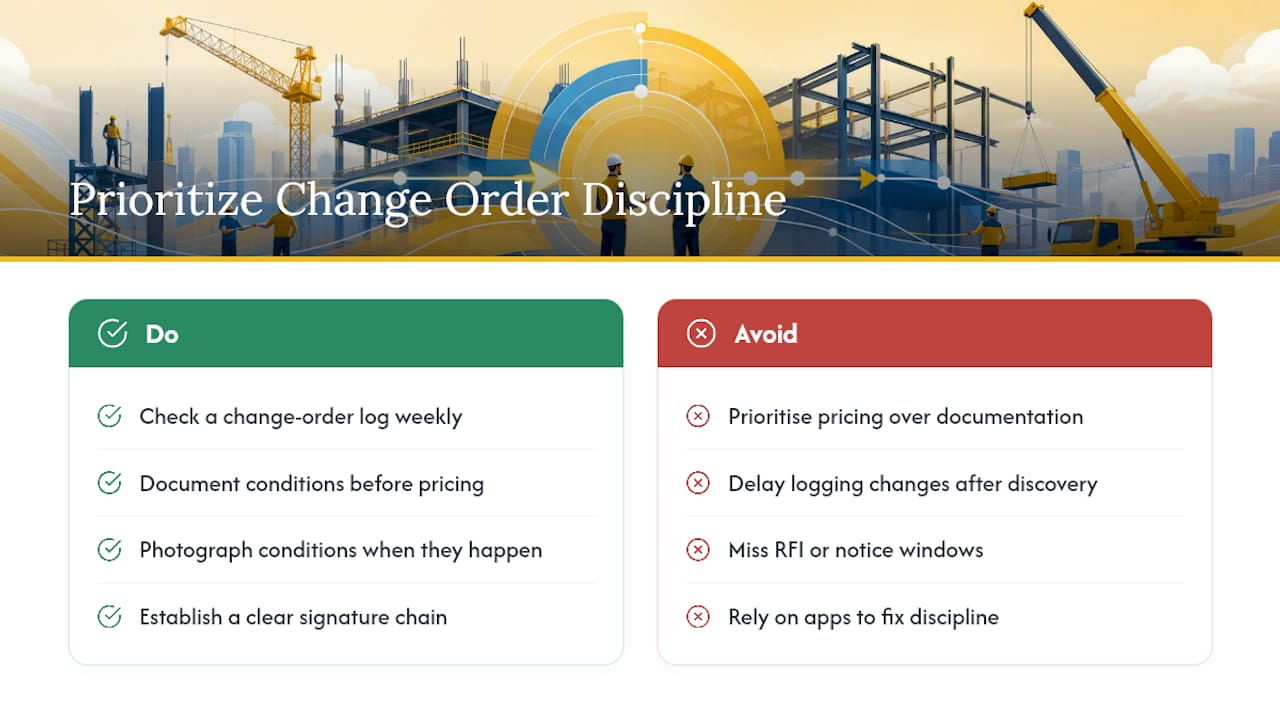
I’d argue the industry has this backward. Teams spend hours perfecting markup percentages on a CO that’s already three weeks late because nobody photographed the condition or filed the RFI when it happened. By the time pricing gets debated, the entitlement argument is often already lost to a missed notice window.
What actually protects margin is boring: a change order log checked weekly, a habit of documenting before pricing, and a clear signature chain nobody has to guess at mid-project. Software helps, but no app fixes a crew that doesn’t log changes the day they happen. That’s a leadership problem, not a technology gap, and it’s the reason operational discipline around change orders tracks so closely with overall company profitability. Fix the habit first. The paperwork gets easier once the behavior is there.
— Dan
Sources
- 9 Step Guide to Construction Change Order Management | Matterport
- 100R-19: Contract Change Management – As Applied in Engineering, Procurement, and Construction
- How Change Orders Work in Construction | Procore
- Change Order Management: A Step-by-Step Guide for Contractors | AECify Blog
0 Comments