
An HVAC service script is a prepared call guide that tells your CSRs what to say, what to ask and what to promise on every inbound call. A good one does five things. It opens warmly, finds out what is wrong, captures the details dispatch needs, handles safety first, and ends with a booked time the caller can repeat back. Below you get the call flow, the questions worth asking, wording for fees and urgent calls, and a way to train the team so the script sounds like a person.
TL;DR
- Build the script as a short path: greet, listen, capture, qualify urgency, offer a window, confirm. Everything else is a branch off that path.
- Ask only what the next person in your process will use. Collect the basics, offer a time, and finish the rest after booking.
- Safety comes before booking. Gas smell, a sounding CO alarm, smoke or sparks get safety instructions first, never a diagnosis or a promised arrival time.
- Say fees and next steps out loud, every call: the amount, whether it is applied to repair, who will contact the caller and when.
- A script is a training and accountability tool. If nobody listens to calls and coaches against it, it will not hold as you grow.
Table of Contents
- What an HVAC phone script is, and what it is not
- The call flow, from greeting to close
- Questions worth asking, and why each one earns its place
- Urgent calls: safety first, promises second
- Explaining fees, windows and next steps
- Sample scripts to adapt
- Make it sound natural
- Training and keeping it consistent as you grow
- Perspective: the script is the easy part
- Where we can help
- FAQ
- Sources
What an HVAC phone script is, and what it is not
A script is a structured guide for consistent customer conversations. The Heating, Refrigeration and Air Conditioning Institute of Canada (HRAI) describes call scripting in exactly those terms, and it lists the content a basic HVAC script should include: a professional greeting, questions about the issue and its urgency, customer and equipment information, answers to common objections, dispatch or escalation rules, appointment expectations and a warm closing.
Notice what is not on that list: a monologue to read word for word. The point is not to make your CSRs sound like recordings. The point is that the same questions get asked, in the same order, whether the call lands on your best CSR or on someone in week two.
For most contractors the problem is not that there is no script. It is one of three other things:
- Each CSR runs the call their own way, so dispatch gets different information every time.
- The script is a long questionnaire that makes callers feel interrogated before they hear a time.
- Nobody owns it, so it never gets updated after a bad call or a new fee.
Fix those three and the wording matters far less than people think.
The call flow, from greeting to close
Several published HVAC and home-service scripts land on nearly the same skeleton. One breaks a call into opening, problem identification, intake, solution and booking, and confirmation. Another uses a four-step flow of greet, qualify urgency, capture information and confirm expectations. A third runs from greeting through fee disclosure to a concrete appointment window and a read-back of the address and next step.
Put together, here is a flow you can adapt.
| Step | What the CSR does | Sample wording |
|---|---|---|
| 1. Open | Names the company and themselves, then asks an open question | Thanks for calling [Company], this is [Name]. What’s going on with your system today? |
| 2. Listen | Lets the caller describe the problem in their own words | (Pause. Take notes. Do not interrupt.) |
| 3. Safety check | Screens for gas, CO, smoke, sparks, vulnerable occupants | Before we go further, do you smell gas or have a carbon monoxide alarm going off? |
| 4. Capture | Name, address, callback number, symptom | Let me make sure I have the right address and the best number to reach you. |
| 5. Qualify | Heating, cooling or both; running or not; how urgent | Is the system running at all right now, or completely off? |
| 6. Disclose | Diagnostic fee and how it works | Our diagnostic fee is [amount]. Here is how it applies to a repair. |
| 7. Offer | A specific appointment window | I can have a technician there between [time] and [time]. Does that work? |
| 8. Confirm | Repeat window, address and next step | So that’s [day], [window], at [address], and you’ll get a call from [who] when they’re on the way. |
The opening matters more than it looks. Starting with an open-ended question, such as asking what is going on with the system today, lets the caller tell the story first, and your targeted follow-ups can then fill only the gaps.
Do not ask everything before offering a time
One operator’s view is that piling on questions before offering a time hurts the experience: collect the basics, offer a slot, and complete the remaining details after booking. We agree. A caller with no cooling in July wants to hear a window. Make that happen first, then ask about gate codes, pets and the make of the unit.
Questions worth asking, and why each one earns its place
Every question on your script should answer this: who will use this answer, and what will they do with it? If the answer is nobody, cut it.
HRAI says a basic script should collect the caller’s full name, phone number, job location, returning-customer status, reason for the call, equipment age, make and model, symptoms and urgency. Other published templates add a few HVAC-specific prompts. A good practical set looks like this:
Must have before you offer a time
- Name, service address and callback number.
- Heating, cooling or both.
- Whether the system is running, and whether the thermostat is on.
- Whether anyone’s health or safety is affected. One template pairs this with questions on when the problem started and whether there are unusual sounds, smells or water.
- Whether you serve the address and can meet the timeline they want.
Useful, but can wait until after booking
- Approximate system age, make and model, and any error code on the display, which a commonly used first-call script lists among the HVAC prompts.
- Property type, and whether the caller is the owner or a tenant. Intake checklists also include access details such as gate codes.
- Prior troubleshooting or earlier visits, plus pets and parking.
- Payment responsibility and how the caller will pay.
If you want a quick test of your own script, print it and highlight every question dispatch or the technician never uses. Those are the ones that slow down your booking rate.
Urgent calls: safety first, promises second
This is the part of the script where a mistake costs the most, so write it as a decision tree, not as advice. HRAI notes that decision trees and if/then instructions reduce improvisation at critical moments, such as routing an emergency versus a routine call. HRAI’s own example is a gas leak: the caller is told to contact emergency services immediately, and HVAC assessment is arranged only once the situation is safe.
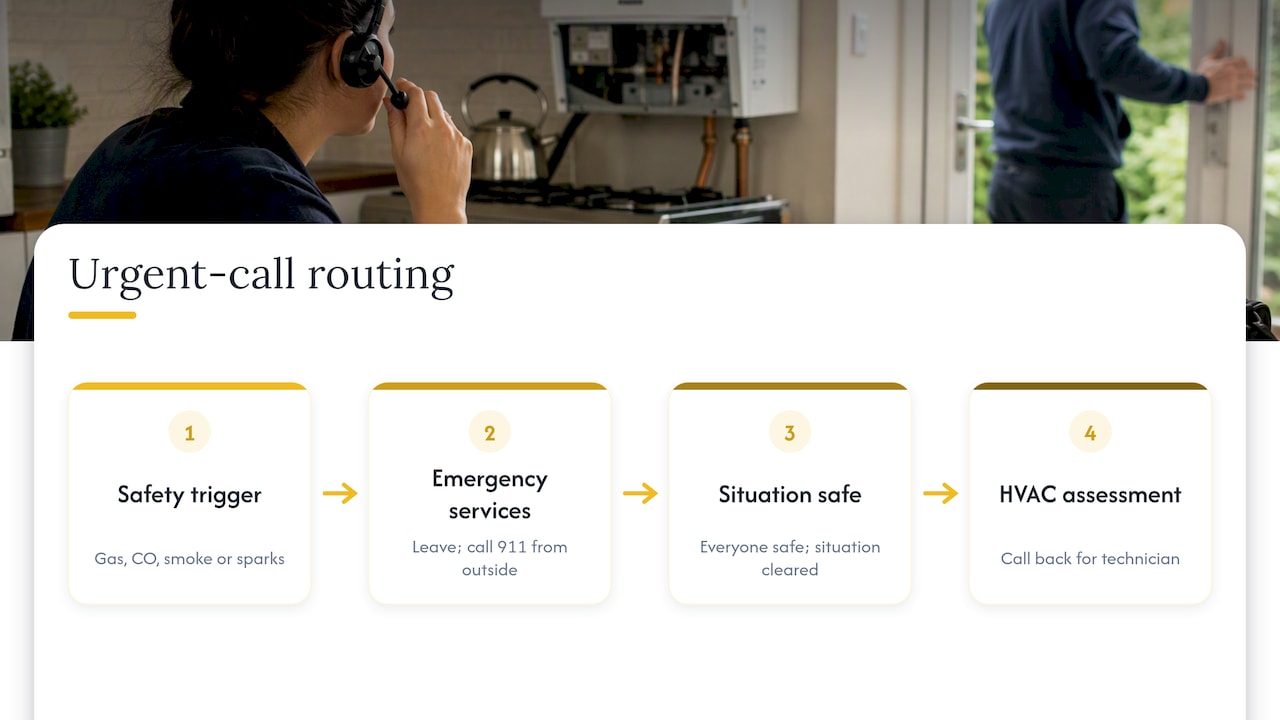
Other guidance treats a gas smell, a sounding carbon monoxide alarm or suspected poisoning, smoke or sparks, and a dangerous loss of heat or cooling as situations where safety instructions come before booking. Your script should name each trigger, say exactly what the CSR says, and say who the CSR hands the call to. Have your technical lead, and your local utility and fire safety guidance, review the wording before it goes live. Your CSRs are not the people to improvise it.
A sample safety branch:
If the caller reports a gas smell, a CO alarm sounding, smoke or sparks: “Please leave the house now and call 911 from outside. Once everyone is safe and the situation has been cleared, call us back and we’ll get a technician out.” Then log the call and alert the on-call lead.
After hours
After-hours staff or an answering service should capture and route urgent calls without promising a specific arrival time. The on-call team confirms timing. The line your CSR can safely say is: “I’m sending this to our on-call technician now, and they’ll call you back at this number.” Reliability comes from a clean handoff, not from a guessed ETA that you then miss.
A handoff note that works for any shift carries six items: caller name, callback number, service address, a problem summary in the caller’s words, an urgency flag and the time the call was received. That is the handoff format one dispatcher template uses, and it is hard to improve on.
Explaining fees, windows and next steps
Most bad reviews about a service call are not about the repair. They are about a surprise: a fee nobody mentioned, a window that slid, a technician nobody announced. Your script should remove each of those.
A good fee-and-expectation line covers:
- The priority level and response window.
- The diagnostic fee amount, and whether it is applied to repair, waived or separate. One template says to tell the caller all of this plus the technician’s expected pre-arrival contact.
- That the diagnostic charge is due whether or not the customer goes ahead with the repair, if that is your policy.
- What happens next, who owns it, when the caller should expect contact and by which channel. Good call paths specify exactly those four things.
Write your fee into the script as a fill-in field, not a hard-coded number, so the one place that changes is the one place you update. We do not quote a typical diagnostic fee here because it varies by market and by company, and what matters is that your CSR says yours without hesitating.
Don’t diagnose over the phone
CSRs should document what the caller observes and avoid turning intake into a remote diagnostic flow. “It sounds like your capacitor” sets an expectation the technician then has to undo. Try: “Thanks, I’ve noted that. Our technician will check it properly when they arrive.”
Say no honestly
If you do not do the work, do not serve the area or cannot meet the timeline, the caller should hear that promptly and, where possible, be referred elsewhere. It costs thirty seconds and it protects your reputation, and your booking numbers do not suffer for it.
Sample scripts to adapt
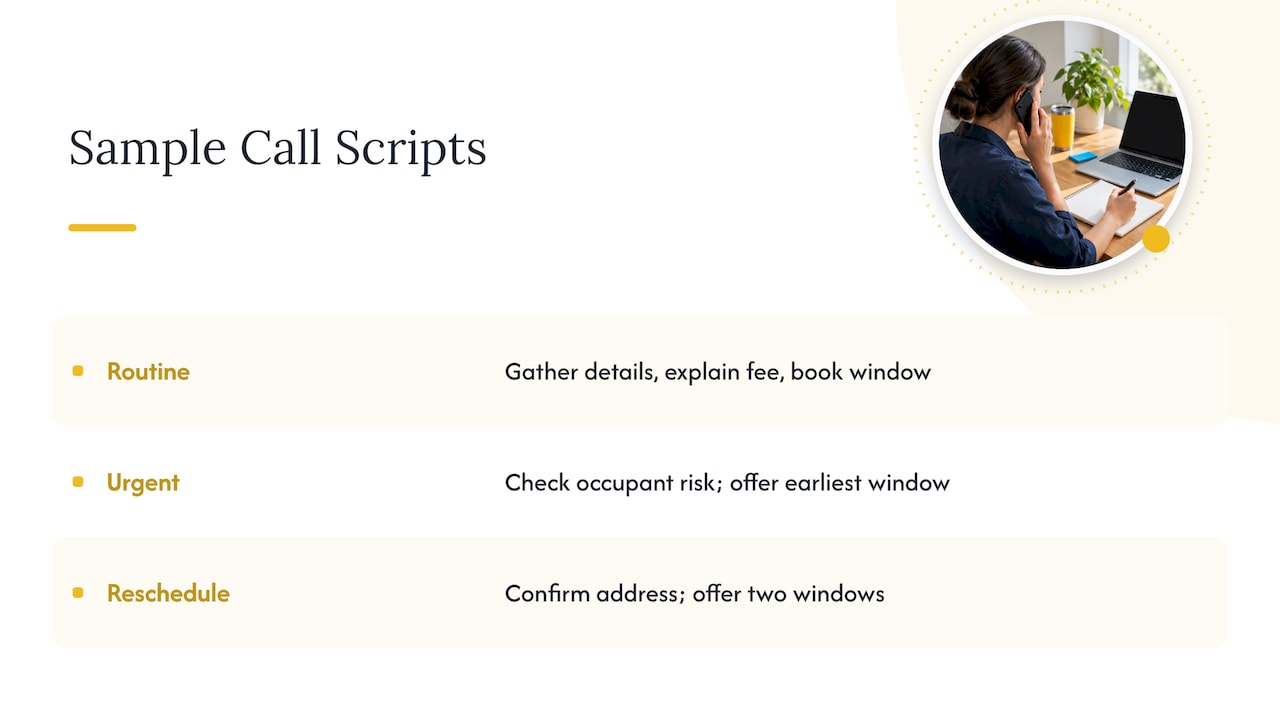
Treat these as skeletons. Replace the brackets, then read them out loud until they sound like your people.
Routine service request
Thanks for calling [Company], this is [Name]. What’s going on with your system today?
(Listen.) I’m sorry about that. Let me grab a few details so we can get someone out. What’s the address, and the best number to reach you?
Is it the heating, the cooling or both? Is the system running right now?
Our diagnostic fee is [amount], and [how it applies]. I have [window] available on [day]. Does that work for you?
Great. So that’s [day], [window], at [address]. [Name or team] will call you when the technician is on the way. Anything else I should pass along, like a gate code or pets?
Urgent but safe (no cooling, vulnerable occupant)
I understand, and I’m treating this as a priority. Is anyone in the home elderly, very young or medically fragile? (Note it.) Let me check the earliest window we can offer you.
(Offer the earliest real window, or hand off to the on-call lead if after hours.)
Reschedule or cancellation
No problem, let me find your appointment. Can I confirm the address? I can move you to [window] on [day], or [window] on [day]. Which works better? Thanks. You’re set for [new time], and you’ll get a confirmation by [channel].
Notice that the reschedule call is short. If a branch feels long, the CSR will skip steps, so keep each branch only as long as the next person needs it to be.
Make it sound natural
People hang up on scripts that sound like scripts. Four habits fix most of it.
- Use plain language. HRAI recommends plain words and no unnecessary HVAC jargon unless the caller understands it. Say “the outdoor unit,” not “the condenser.”
- Standardize the questions, not the voice. A script standardizes important questions and wording while still letting CSRs personalize the conversation. Give CSRs a required list and let them phrase the empathy themselves.
- Make it yours. A checklist should be personal to the company and communicate what makes it different. If you offer a no-surprise price or a call-ahead text, say so in the opening or the close.
- Build it in modules. A modular script is safer than one long questionnaire: a common opening, intent identification, branches by need, and only the information the next person will use. Keep separate branches for new service, repair follow-up, maintenance-plan members, estimates and billing.
Training and keeping it consistent as you grow
A script on a shared drive does nothing. What turns it into a system is the routine around it.
- Role-play before live calls. Every new CSR runs the routine, urgent and reschedule branches with someone who plays a frustrated caller.
- Listen to calls weekly. Pick five per CSR. Score them against three or four items: did they ask the open question, run the safety check, say the fee, and repeat back the window.
- Track booking rate by CSR and by call type. If one person books far fewer calls than the others, listen to their calls before assuming it is the leads.
- Update after a miss. Every complaint about a missed window or an unexpected fee should lead to a line change in the script, with a version date.
- Tie it to the rest of the team. Calls only convert if the technicians and dispatch honor what the CSR promised. Our post on technician spiff ideas covers how to reward the behaviors you are asking for, and the one on stay interviews for contractors covers keeping the CSRs you spent weeks training.
When call volume grows, forecasting matters too. Staffing the phones for your peak season is a planning problem, and our labor forecasting guide for contractors walks through it.
Perspective: the script is the easy part
When we work with HVAC, plumbing and electrical owners, we rarely find that the phone script is the real problem. We find that nobody owns the call. Dispatch has one idea of what a booked job is, the CSRs have another, and the owner learns about the gap only when a customer complains or a slow week shows up in the numbers.
A script helps because it forces you to decide those things in writing: what counts as urgent, what the fee is, who gets the handoff, what a good call sounds like. But a script without a manager who listens to calls, a KPI that shows booking rate, and a clear line from the call to the dispatch board will drift within a month. That is a leadership and accountability issue, not a wording issue.
So our advice is to write the shortest script that works, put one person in charge of it, and review real calls against it every week. Then build the dispatch and scheduling habits behind it. The phones are the front door of the whole operation, and in a trade business the front door deserves the same discipline as the truck and the install.
— Dan
Where we can help
If your calls are booking inconsistently, the cause usually sits in training, dispatch rules and accountability, not only in the words on the page. Our Call Management & Dispatch Training is part of Rebuild, our hands-on program for trade businesses, alongside sales, management and leadership, install and project management, financial operations and marketing analysis. We work only with trades, and we work inside your operation rather than handing you a template.

Pricing for these services is not published, so the next step is to reach out through the Rebuild page and tell us where your calls break down.
FAQ
What should a basic HVAC call script include?
A professional greeting, questions about the issue and its urgency, the caller’s and the equipment’s details, answers to common objections, dispatch or escalation rules, appointment expectations and a warm closing. HRAI lists these as the core of a basic script. Add the safety branch and your fee line, and you have a solid first draft.
How long should an HVAC phone call take?
Long enough to capture the essentials and book a window, and no longer. We would rather you aim at a call that gets the basics, offers a time and confirms it, and leaves the extra details for a follow-up. Listen to your own calls and cut any question the technician and dispatch never use.
Should CSRs diagnose the problem on the phone?
No. They should write down what the caller describes and what the system is doing, then pass it to the technician. Guidance for answering services is to document observations without turning intake into a remote diagnosis. A wrong guess on the phone creates an expectation the technician has to correct on site.
What should we say on an after-hours emergency call?
Run the safety check first. For a gas smell, a sounding CO alarm, smoke or sparks, the caller gets safety instructions before any booking. For other urgent calls, capture the details and route them to the on-call team without promising an exact arrival time. The on-call technician confirms timing.
How do we get CSRs to actually use the script?
Make it short, role-play it, and review real calls every week against three or four scored items. Let staff keep their own voice while the required questions stay fixed. Update the script whenever a call goes wrong, so your team sees it as a living tool.
Sources
- HRAI: Call scripting for HVAC professionals
- Building a call script for home service contractors
- HVAC dispatcher script template and call intake checklist
- HVAC CSR script from greeting to close
- First phone call scripts for home-service businesses
- HVAC dispatch script template
- Inbound lead call script for service businesses
- Contractor dispatcher script template
- HVAC answering service script and checklist
- How HVAC call scripts help boost booking rates
- HVAC phone scripts guide
0 Comments